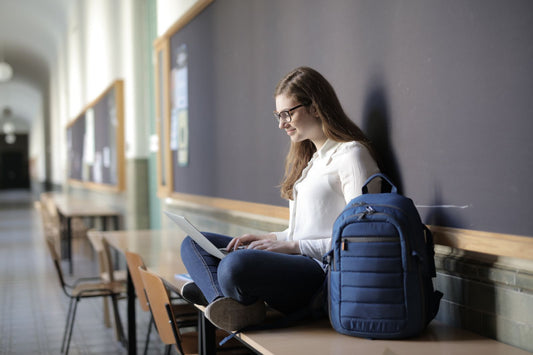


If you commute with a laptop, your backpack is doing more than carrying cargo — it's the only thing between a $2,000 piece of electronics and a concrete sidewalk every time you set the pack down. The difference between a good laptop backpack and an okay one is mostly invisible: it's how the sleeve is constructed, how the load distributes, and how the seams handle a rainstorm.
What makes a backpack "laptop-grade"
1. A suspended padded sleeve
The single most important feature. The sleeve should end 1–2 inches above the bottom of the pack, suspended by foam, so that when you set the pack down (or drop it), the laptop doesn't hit the ground. Look for at least 8mm of EVA foam padding around the entire sleeve.
Test: empty pack, set it down hard on a table. Did the laptop sleeve hit the table? If yes, walk away.
2. Sleeve dimensions matched to your laptop
Laptops are measured by screen diagonal, but sleeves need to match the chassis dimensions. Here's the rough mapping:
- 13" laptop (MacBook Air, XPS 13): sleeve interior ≥ 32cm x 22cm
- 14" laptop (MacBook Pro 14, XPS 14): sleeve interior ≥ 33cm x 23cm
- 15" laptop (MacBook Air 15, ThinkPad X1): sleeve interior ≥ 35cm x 24cm
- 16" laptop (MacBook Pro 16): sleeve interior ≥ 36cm x 25cm
- 17" laptop (gaming, ROG): sleeve interior ≥ 40cm x 27cm
A sleeve that's too big lets the laptop slide around — worse than no sleeve. A sleeve that's too small puts pressure on the corners. Measure your laptop, then read the sleeve spec carefully.
3. A separate compartment, not just a divider
The laptop should live in its own zippered compartment, separated from books, water, and snacks. A divider in the main compartment isn't enough — books bang against the laptop, water bottles can leak onto it.
4. Weather-resistant construction
For commuting, Cordura® 500D with DWR is the baseline. For monsoon climates, look for TPU laminate or welded seams. Check that the laptop compartment zipper has a storm flap or is itself weather-sealed.
5. Ergonomics that handle a 1.5–2kg laptop + cargo
A modern 16" laptop weighs 2.1kg. Add charger (0.4kg), tablet (0.5kg), water bottle (0.7kg), notebook (0.5kg) and you're at 4.2kg before you've packed lunch or gym clothes. You need:
- Padded S-curved shoulder straps
- Sternum strap
- Ventilated back panel
- Framesheet (rigid back support)
- Optional but recommended: hip belt for loads over 7kg
Capacity recommendations by use case
- Office worker, 13–14" laptop, light load: 18–20L
- Office worker, 15–16" laptop, daily cargo: 20–25L
- Commuter who brings gym clothes: 25–30L with separate shoe compartment
- Frequent traveler with laptop + 1–3 day clothes: 30–40L (carry-on compliant)
- Tech road warrior with 2 laptops + tablet + camera: 25–35L with multi-device organization
Best laptop backpack features by occupation
Software engineer / remote developer: 22–28L, 15–16" laptop sleeve, plenty of pockets for chargers and cables, padded tablet slot, water bottle pocket. Bonus: lockable zippers for cafe work.
Consultant / business traveler: 25–30L, carry-on compliant, separate organized tech section, suit-friendly slim profile, luggage pass-through strap.
Field tech / on-site engineer: 28–35L with tool organization, rugged Cordura® 1000D construction, lockable main, separate dirty/clean compartment.
Creative professional with MacBook Pro 16" + iPad Pro: 22–28L with oversized 16" sleeve, dedicated iPad slot, accessory pockets for Pencil and Magic Mouse.
Photographer with laptop + 1 camera body + 2 lenses: 25–30L with modular camera dividers in lower compartment, laptop in upper, plus tripod attachment.
What to avoid
- "Anti-theft" packs that hide all zippers — great in theory, but they're miserable to access in real life.
- Sleeves rated to "up to 17 inches" that are actually sized for 15". Always measure.
- Soft floppy laptop sleeves with under 6mm of padding. They look slim but offer no real protection.
- Open-top laptop pockets without zipper closure. The laptop slides out when the pack tips over.
- Single-strap sling bags over 4kg total weight. Bad for your spine.
The smart-features question
USB charging ports, RFID-blocking pockets, integrated chargers, Apple Find My tags — worth it?
- USB pass-through — nice to have, the cable itself often breaks. Most users carry a separate power bank anyway.
- RFID-blocking pockets — marginal value. Modern cards are mostly RFID-safe. A regular zippered pocket is fine.
- Integrated chargers — the battery inside dies in 18 months. Skip.
- Find My integration — actually useful for travel. Worth a small premium.
Custom laptop backpacks for tech companies and coworking spaces
If you're outfitting a team or a coworking membership, the same specs apply at scale. Backper's Custom & Branded line builds laptop-spec backpacks from 50 units with sleeve sizing matched to your company-issued device, custom embroidery or deboss, and lead times around 21 days.
The bottom line
The best laptop backpack does one thing perfectly: protects your laptop. Suspended padded sleeve, weather-resistant construction, real ergonomics, and a sleeve sized to your specific device. Get those four right and the pack will outlast 2–3 laptops.
Related reading: Curious how much abuse the zippers on that laptop compartment can actually take? See our Journal deep-dive inside the YKK zipper factory. And if you're commuting somewhere wet, check Waterproof vs Water-Resistant Backpacks before you buy.
Buying for a shop, a team or a client? We supply these styles wholesale — browse laptop backpacks, business and custom & branded. MOQ 50, volume discounts to 29%, UK/EU DDP delivery. Request a quote and we'll reply within 4 hours.
Tags:
Previous
How to Organize Your Backpack Efficiently: Compartments, Packing Tips, and Daily Setup
Next
How to Pick the Perfect Day Hiking Backpack: A Beginner's Guide
Related articles


-
Jul 16 2026